
Online Assessment FAQs
Technical Tips
Internet Access
- You will need a reliable internet connection.
- Please also be aware that once you start an assessment it must be completed in one go, so please ensure your setup is stable (i.e. to prevent power or network loss during a test).
- If your internet connection is interrupted during a test for any reason, including the shutting down of your computer or the closing of your web browser or its tab, you may not be able to resume the test.

System & Web Browser
- When completing an assessment online we advise using a computer (e.g. PC, laptop, Mac) with a separate mouse and not a trackpad.
- A modern web browser should be used such as Chrome, Safari, Firefox or Edge.
- We recommend that you use the latest browser versions and operating systems.
- Please do not use a beta version of any web browser or operating system. Beta versions are early test releases that might have bugs or not work properly with all websites. For example, using a beta version of Google Chrome might cause parts of our site to break or behave unpredictably. For the best experience, stick to the regular, stable versions.
Frequently Asked Questions
Preparing for Your Assessment
To help you prepare for your test there may be a practice test on our website that is similar to the test you will be taking. We recommend, where possible, trying a practice test before taking the actual assessment. Research has shown that practice helps to improve the chances of performing well on the real assessment. You can use the Practice Finder on the website to search for the test you’ll be sitting. This will show any relevant practice materials available for that test. For some tests, both a free version and a paid version are available. The paid version includes more questions and is a longer version of the free practice, providing more thorough preparation. All practice tests are only available as a downloadable PDF. Some PDFs are interactive which can be completed on a computer; however, some might require printing. If there is a free version available, there will be a link under the title to access it. To access a paid version, click ‘Add to Basket’ next to the practice test you’d like, then proceed to ‘Checkout’. Once your order is complete, you’ll receive an email with download instructions. You will have 30 days to download the PDF. This cannot be re-sent so please make sure you download your practice material as soon as you purchase it. Research has shown that practice helps to improve the chances of performing well on an assessment. The purpose of a practice test is to familiarise you with what will be expected of you when you complete the real test. It is not a mini version of the real test, nor is it intended to train you to pass the real test. Therefore, you will find the contents of the practice test to be similar, but not identical to the real test. Regardless of whether you are sitting an online or paper version of the test, the practice materials will still help you to do your best, even if you do the practice on paper. If you have been invited to complete a test designed by OPC Assessment, it is recommended you practice for that test with authorised practice materials that have also been designed by OPC Assessment. Some individuals may find aspects of completing a psychometric test more challenging due to a disability or condition, and in some instances adjustments can be made to ensure a fair experience for all candidates. In many cases, challenges can be addressed through appropriate settings, for example, extra time for individuals with dyslexia or other neurodivergent conditions. As everyone’s needs are different, any adjustments should be considered on a case-by-case basis. To help with this, you may be required by the recruiter to provide supporting evidence or documentation of your disability or condition, and the challenges you experience as a result. If you require any potential reasonable adjustments, we strongly encourage you to contact the company you are applying to as early as possible. Being open about your needs can help ensure you have the best opportunity to demonstrate your abilities. It is recommended that you complete the test(s) and practice tests in a quiet room, free of distractions and in silence. You may wish to remind other household members that you are sitting an assessment to prevent them disturbing you. One of the key benefits of online assessments is that you can complete them at a time that suits you. It’s important to choose a time when you feel focused and alert. For example, avoid taking the test if you’re feeling tired or unwell, as this may affect your performance. In most cases, you'll be given several days to complete the test(s). However, it's important to check whether a specific deadline has been set—if so, your assessment must be completed before that time. Please note that all deadlines are given using the 24-hour clock. For further details, see the ‘Deadlines and Timing’ section.Where can I find practice tests?
Why should I practice?
I need a reasonable adjustment to perform at my best – what should I do?
Where should I undertake my assessments?
When should I take my assessment?
Accessing Your Assessment
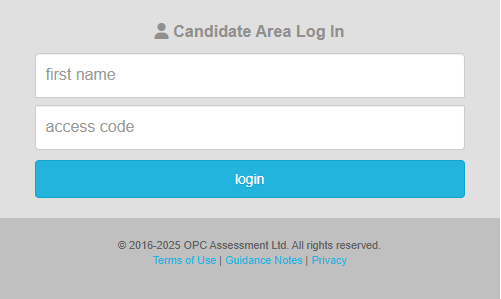
If you have been invited to complete an assessment, you will receive an email invite from admin@theopc.co.uk. Once you have received the email invite, please read it carefully. Then follow the link in the email to visit the OPC Candidate Login Page and login using the login details provided (First Name & Access Code). Make sure you use the exact same details as provided in your invite. Please note the Access Code is case sensitive. When logging in you will be provided with some Terms of Use and Guidance Notes, please read these carefully, they provide you with information regarding how to do your best. If you have been invited to complete an assessment, you will receive an email invite from the email address admin@theopc.co.uk. If you’re expecting an invitation but can’t find it in your inbox , please check your junk or spam folder, as it may have been filtered there by your email provider. If you still haven’t received the invitation, please get in touch with the organisation you’re applying to. Please note: if you have previously marked emails from us as spam or made a spam complaint, you will not be able to receive future invitations until you withdraw the spam complaint. To find your access code, see the email from admin@theopc.co.uk inviting you to complete an assessment. The email will provide your login details, i.e. First Name & Access Code, for the OPC Candidate Login Page. Please note the Access Code is case sensitive. When logging in, make sure you use the exact same details as provided in your invite. We recommend copying and pasting the details from your invite. The candidate login page URL is: https://extranet.theopc.co.uk/test/ If you are having issues with the URL provided in your email invite, please try the one shown above.How do I access my assessment?
Where is my email invitation?
Where can I find my Access Code?
Where do I go to log into my assessment?
Troubleshooting Login Issues?
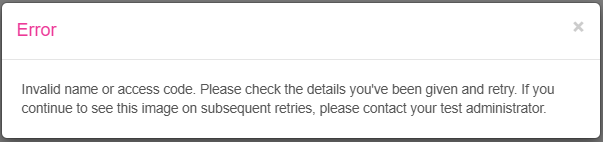
If you're trying to log in via the OPC Candidate page and recieve an error message stating, ‘There are no tests currently assigned to you’, this could be due to one of the following reasons: If you're unsure or have any questions, please contact the organisation you're applying to for further assistance. If you recieve the error message, ‘Invalid name or access code. Please check the details you've been given and retry. If you continue to see this image on subsequent retries, please contact your test administrator’, it may be because: Please check your invite email to make sure you use the exact same details as provided in your invite. If you've double-checked your details and still can't log in, please contact the organisation you’re applying to for further assistance.Error message when logging in: “There are no tests currently assigned to you”

Error message when logging in: "Invalid name or access code"
Deadlines and Timing
If you’re unable to meet the deadline, or have already missed it, please contact the company you applied to as soon as possible. They will determine and advise you on the next steps. If an assessment you have been assigned states within the deadline field: ‘PIN required for this assessment’. This means it is a supervised assessment, and a separate PIN will be required to access this test. This will be provided to you by your test administrator on the day of the supervised assessment. Please note the PIN is different from your access code. If you're unsure or have any questions, please contact the organisation you're applying to for further assistance. When you log into the testing site and view your assigned assessments, each one will display the following: For untimed tests, there is no time limit—the test will end only once you’ve completed all the questions. In most cases, you can complete the assessments in any order unless instructed otherwise. However, if any have a deadline assigned, we would recommend completing those first.What should I do if I can’t meet, or have missed, the assessment deadline?
When I try to start the test, it’s asking for a PIN?

How will I know how much time I have to complete an assessment?

There are multiple tests assigned to me – do I need to complete them in a specific order?
During the Assessment
Once you begin a test, you must complete it in one sitting, it cannot be paused or interrupted. Please ensure you won't be disturbed during this time. Please note, you will have already seen the preparation time required as well as the time needed for the actual test itself before entering the test. For some applications, you may be asked to complete multiple tests. However, you don’t need to take them all at once. You’ll usually have several days to finish them. That said, please check the deadline provided in your invitation email to ensure you complete everything on time. Always use the navigation buttons provided within the test window (e.g. ‘Back’ and ‘Continue’) to move between questions. Please do not use your web browser’s back, forward, or refresh buttons during the test, as this may interrupt or even end your test session. Please note: you can only go back to previous questions or move onto the next page of questions once you’ve answered all the questions on your current page. Avoid navigating away from the test session window, for example, by opening a new tab or browser window. If you do, a warning may appear, and the organisation you're applying to will be notified. Tests must be completed in a single sitting. If you exit before the test has ended, you won’t be able to re-enter or resume it. If this happens, please contact the organisation that invited you to take the assessment for further guidance, they will determine how they wish to handle this situation.Can I take breaks during a test?
How should I navigate through the test?
I left the test before the session had ended, why can’t I get back in?
Finishing the Assessment
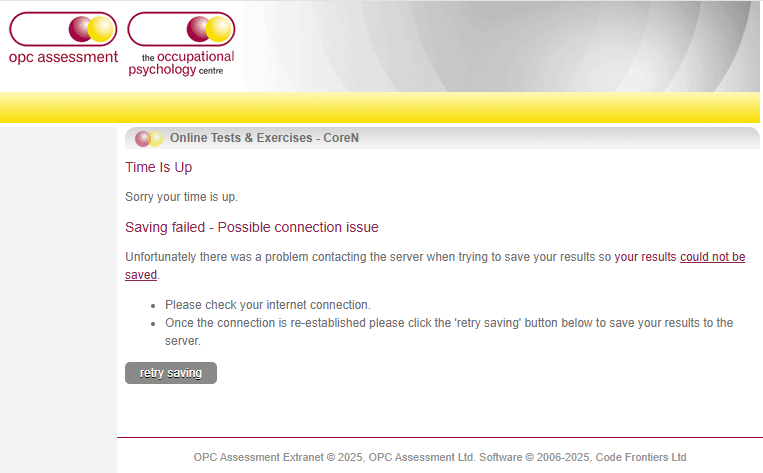
If you're completing a timed test and the time runs out, the test will automatically end and you'll be taken to a page titled “Time Is Up”. Please don’t worry if you’re unable to answer all the questions within the time limit. If your test is untimed or you manage to get to the end of a timed test, when you reach the last question there is a ‘finish test’ button. When you click on ‘finish test’ your test session will end and you’ll be taken to page titled “Thank You”. When your test ends either by completing all the questions, or by timing out, a page will be shown indicating your results have been saved. The message will typically say: “Thank you for your time, your results have been saved” If you close your browser before seeing this message, your progress, including any questions you've answered, will not be saved. If there is no connection at the end of your test then you will receive an error message like the one below. Please do not close your browser. Check your internet connection. Once the connection is re-established, please click the 'retry saving' button to save your results to the server. Once you’ve done all the tests, you simply need to wait. The organisation you’ve applied to will contact you with feedback and let you know about the next steps in their process. Please note that the extent of the feedback you receive will be at the hiring company's discretion.What happens at the end of a test?
I timed out
How will I know my results have been saved?
I received a message at the end of my test saying "Saving Failed - Possible connection issue", what do I do?
What happens after I’ve done all my tests?